Monitoring Network Health with PowerShell: A High Ping and Timeout Logging Script
Some Background
Over my summer months I began noticing that I was getting internet drop outs during regular use of my family network but only on my PC. I was still connected to wifi but I couldn’t load anything and this was very frustrating. The outage wasn’t much longer than a few minutes and would return just as mysteriously as it appeared, but I wanted to get to the bottom of it. This led to a rabbit hole of looking for the problem(s), my PC gets its connection via Wi-Fi from my motherboard and uses two antennas coming out of the IO as its source. My first thought was maybe one my antenna’s had become disconnected, damaged, or otherwise was non functioning. That was fine, next I made sure my network adapter’s drivers were up to date, and then I got a recommendation from a friend to test out how my connection to my router over a public DNS like Google’s 8.8.8.8. This method allowed me to see how my connection is with my router, and my connection to the internet.
Why I made this script
Just to get a basic reading of my current connection I got the IP of my router and like I mentioned earlier used Google’s public DNS and threw them into command prompt using the commands:
1
2
ping -t 8.8.8.8 #To test our connection to the internet
ping -t 192.168.0.1 #To test my PC's connection with the router
For those who didn’t know -t will make the ping command run continuously. So I ended up with two command prompt windows, giving me lines and lines of ping requests it looked something like this:
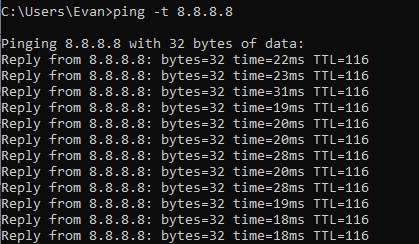
Now I was printing out lines upon lines of ping requests, which does in fact work, but I wanted to automate it and a way to sort through the results, and to know when I had lost connection or otherwise between the two hosts. Hence the entire reason behind this PowerShell ping script.
Relearning PowerShell
My most recent project posted on GitHub before this was the Hash-GUI script I made eight years ago in python. While I haven’t been away from programming for nearly that long and have been working on my own projects I decided that I was going to start uploading again on Github as a good way for me to document my progress, hence this blog.
First I needed to refamiliarize myself with PowerShell syntax. I still had some programming basics from my previous project in early may. I participated in the Bullet Hell Game Jam before I went on to make this script. My game was developed using the Godot engine, which employs its own scripting language called GDScript, similar to Python. So jumping back into programming with PowerShell, I found it relatively easy to grasp due to my foundational programming knowledge. However, I still utilized some resources to help me get started of which I can highly recommend Jacked Programmer’s PowerShell playlist in conjunction with the Powershell documentation to bring this script to life.
What does it actually do?
This script preforms a periodic ping to a list of specified hosts. It monitors for high latency and connection drops, which are then logged into a txt file. You can edit what hosts you want to ping and how high of a ping threshold do you consider too high and want to be logged.
The Code
I highly recommend you look at the repo for this script as it might help you work through how it all functions. This does work by itself mind you I just think it may be easier to read on the repo. Here is the full script:
1
2
3
4
5
6
7
8
9
10
11
12
13
14
15
16
17
18
19
20
21
22
23
24
25
26
27
28
29
30
31
32
33
34
35
36
37
38
39
40
41
42
43
44
45
46
47
48
49
50
51
52
53
54
55
56
57
58
59
60
61
62
63
64
65
66
67
68
69
70
71
72
73
74
75
76
77
78
79
80
81
82
83
84
85
<figure class="highlight"><pre><code class="language-powershell" data-lang="powershell"><span class="nv">$hosts</span><span class="w"> </span><span class="o">=</span><span class="w"> </span><span class="p">@(</span><span class="s2">"192.168.0.1"</span><span class="p">,</span><span class="w"> </span><span class="s2">"8.8.8.8"</span><span class="p">)</span><span class="w">

</span><span class="nv">$pingResults</span><span class="w"> </span><span class="o">=</span><span class="w"> </span><span class="p">@{}</span><span class="w">

</span><span class="nv">$pingThreshold</span><span class="w"> </span><span class="o">=</span><span class="w"> </span><span class="mi">10</span><span class="w">

</span><span class="kr">function</span><span class="w"> </span><span class="nf">Check-Ping</span><span class="w"> </span><span class="p">{</span><span class="w">
    </span><span class="kr">param</span><span class="w"> </span><span class="p">(</span><span class="w">
        </span><span class="p">[</span><span class="n">string</span><span class="p">]</span><span class="nv">$TargetHost</span><span class="w">
    </span><span class="p">)</span><span class="w">

    </span><span class="n">Write-Output</span><span class="w"> </span><span class="s2">"Pinging </span><span class="nv">$TargetHost</span><span class="s2">..."</span><span class="w">

    </span><span class="kr">try</span><span class="w"> </span><span class="p">{</span><span class="w">

        </span><span class="nv">$pingResult</span><span class="w"> </span><span class="o">=</span><span class="w"> </span><span class="n">Test-Connection</span><span class="w"> </span><span class="nt">-ComputerName</span><span class="w"> </span><span class="nv">$TargetHost</span><span class="w"> </span><span class="nt">-Count</span><span class="w"> </span><span class="nx">1</span><span class="w"> </span><span class="nt">-ErrorAction</span><span class="w"> </span><span class="nx">Stop</span><span class="w">
        </span><span class="nv">$responseTime</span><span class="w"> </span><span class="o">=</span><span class="w"> </span><span class="nv">$pingResult</span><span class="o">.</span><span class="nf">ResponseTime</span><span class="w">
        </span><span class="nv">$timestamp</span><span class="w"> </span><span class="o">=</span><span class="w"> </span><span class="n">Get-Date</span><span class="w"> </span><span class="nt">-Format</span><span class="w"> </span><span class="s2">"yyyy-MM-dd HH:mm:ss"</span><span class="w">

        </span><span class="n">Write-Output</span><span class="w"> </span><span class="s2">"Ping result for </span><span class="nv">${TargetHost}</span><span class="s2">: </span><span class="nv">${responseTime}</span><span class="s2"> ms"</span><span class="w">


        </span><span class="nv">$pingResults</span><span class="p">[</span><span class="nv">$TargetHost</span><span class="p">]</span><span class="w"> </span><span class="o">=</span><span class="w"> </span><span class="nv">$responseTime</span><span class="w">


        </span><span class="kr">if</span><span class="w"> </span><span class="p">(</span><span class="nv">$responseTime</span><span class="w"> </span><span class="o">-gt</span><span class="w"> </span><span class="nv">$pingThreshold</span><span class="p">)</span><span class="w"> </span><span class="p">{</span><span class="w">
            </span><span class="n">Write-Output</span><span class="w"> </span><span class="s2">"High ping detected on </span><span class="nv">$TargetHost</span><span class="s2"> - </span><span class="nv">${responseTime}</span><span class="s2"> ms at </span><span class="nv">$timestamp</span><span class="s2">"</span><span class="w">


            </span><span class="nv">$logMessage</span><span class="w"> </span><span class="o">=</span><span class="w"> </span><span class="s2">"High ping detected on </span><span class="nv">${TargetHost}</span><span class="s2"> - </span><span class="nv">${responseTime}</span><span class="s2"> ms at </span><span class="nv">${timestamp}</span><span class="se">`n</span><span class="s2">"</span><span class="w">
            </span><span class="kr">foreach</span><span class="w"> </span><span class="p">(</span><span class="nv">$currentHost</span><span class="w"> </span><span class="kr">in</span><span class="w"> </span><span class="nv">$hosts</span><span class="p">)</span><span class="w"> </span><span class="p">{</span><span class="w">
                </span><span class="kr">if</span><span class="w"> </span><span class="p">(</span><span class="nv">$pingResults</span><span class="o">.</span><span class="nf">ContainsKey</span><span class="p">(</span><span class="nv">$currentHost</span><span class="p">))</span><span class="w"> </span><span class="p">{</span><span class="w">
                    </span><span class="nv">$logMessage</span><span class="w"> </span><span class="o">+=</span><span class="w"> </span><span class="s2">"Ping result for </span><span class="nv">${currentHost}</span><span class="s2">: </span><span class="nv">${pingResults[$currentHost]}</span><span class="s2"> ms at </span><span class="nv">${timestamp}</span><span class="se">`n</span><span class="s2">"</span><span class="w">
                </span><span class="p">}</span><span class="w"> </span><span class="kr">else</span><span class="w"> </span><span class="p">{</span><span class="w">
                    </span><span class="nv">$logMessage</span><span class="w"> </span><span class="o">+=</span><span class="w"> </span><span class="s2">"Ping result for </span><span class="nv">${currentHost}</span><span class="s2">: No result at </span><span class="nv">${timestamp}</span><span class="se">`n</span><span class="s2">"</span><span class="w">
                </span><span class="p">}</span><span class="w">
            </span><span class="p">}</span><span class="w">
            </span><span class="nv">$logMessage</span><span class="w"> </span><span class="o">|</span><span class="w"> </span><span class="n">Add-Content</span><span class="w"> </span><span class="nt">-Path</span><span class="w"> </span><span class="s2">"ping_log.txt"</span><span class="w">
        </span><span class="p">}</span><span class="w">
    </span><span class="p">}</span><span class="w"> </span><span class="kr">catch</span><span class="w"> </span><span class="p">{</span><span class="w">

        </span><span class="nv">$timestamp</span><span class="w"> </span><span class="o">=</span><span class="w"> </span><span class="n">Get-Date</span><span class="w"> </span><span class="nt">-Format</span><span class="w"> </span><span class="s2">"yyyy-MM-dd HH:mm:ss"</span><span class="w">
        </span><span class="n">Write-Output</span><span class="w"> </span><span class="s2">"Request timed out or error occurred on </span><span class="nv">$TargetHost</span><span class="s2"> at </span><span class="nv">$timestamp</span><span class="s2">"</span><span class="w">


        </span><span class="nv">$logMessage</span><span class="w"> </span><span class="o">=</span><span class="w"> </span><span class="s2">"Request timed out or error occurred on </span><span class="nv">${TargetHost}</span><span class="s2"> at </span><span class="nv">${timestamp}</span><span class="se">`n</span><span class="s2">"</span><span class="w">
        </span><span class="nv">$logMessage</span><span class="w"> </span><span class="o">+=</span><span class="w"> </span><span class="bp">$_</span><span class="o">.</span><span class="nf">Exception</span><span class="o">.</span><span class="nf">Message</span><span class="w">
        </span><span class="nv">$logMessage</span><span class="w"> </span><span class="o">|</span><span class="w"> </span><span class="n">Add-Content</span><span class="w"> </span><span class="nt">-Path</span><span class="w"> </span><span class="s2">"ping_log.txt"</span><span class="w">
    </span><span class="p">}</span><span class="w">
</span><span class="p">}</span><span class="w">


</span><span class="n">Write-Output</span><span class="w"> </span><span class="s2">"Starting script at </span><span class="si">$(</span><span class="n">Get-Date</span><span class="w"> </span><span class="nt">-Format</span><span class="w"> </span><span class="s1">'yyyy-MM-dd HH:mm:ss'</span><span class="p">)</span><span class="s2">"</span><span class="w">
</span><span class="kr">while</span><span class="w"> </span><span class="p">(</span><span class="bp">$true</span><span class="p">)</span><span class="w"> </span><span class="p">{</span><span class="w">

    </span><span class="nv">$pingResults</span><span class="o">.</span><span class="nf">Clear</span><span class="p">()</span><span class="w">

    </span><span class="kr">foreach</span><span class="w"> </span><span class="p">(</span><span class="nv">$currentHost</span><span class="w"> </span><span class="kr">in</span><span class="w"> </span><span class="nv">$hosts</span><span class="p">)</span><span class="w"> </span><span class="p">{</span><span class="w">
        </span><span class="n">Check-Ping</span><span class="w"> </span><span class="nt">-TargetHost</span><span class="w"> </span><span class="nv">$currentHost</span><span class="w">
    </span><span class="p">}</span><span class="w">

    </span><span class="n">Write-Output</span><span class="w"> </span><span class="s2">"Waiting for 1 second before next check..."</span><span class="w">
    </span><span class="n">Write-Output</span><span class="w"> </span><span class="s2">""</span><span class="w">  </span><span class="c"># Adds a blank line
</span><span class="w">
    </span><span class="n">Start-Sleep</span><span class="w"> </span><span class="nt">-Seconds</span><span class="w"> </span><span class="nx">1</span><span class="w">
</span><span class="p">}</span><span class="w">
</span><span class="n">Write-Output</span><span class="w"> </span><span class="s2">"Script completed at </span><span class="si">$(</span><span class="n">Get-Date</span><span class="w"> </span><span class="nt">-Format</span><span class="w"> </span><span class="s1">'yyyy-MM-dd HH:mm:ss'</span><span class="p">)</span><span class="s2">"</span><span class="w">
</span><span class="n">Read-Host</span><span class="w"> </span><span class="nt">-Prompt</span><span class="w"> </span><span class="s2">"Press Enter to exit"</span><span class="w">
</span><span class="err">``</span><span class="se">`</span></code></pre></figure>


### In summary:
 1. We setup some variables to hold our list of hosts and our ping threshold.

 2. Then our ping function (Check-Ping), compares response
    time to the given threshold and logs results accordingly. It is also
    looking for timeouts and errors but I couldn't figure out how to get
    it to be too specific on what kind of error.

 3. All of this goes through our main loop so that we can continuously ping our hosts and see what gets logged over a period of time.

### Example Log Output:
Here is what the log.txt file could look like, for this example in the first output my threshold was a low 10ms, on normal function I will usually set the threshold to anything over 200ms as shown on the second output.
High ping detected on 8.8.8.8 - 21 ms at 2024-07-31 00:55:04 Ping result for 192.168.0.1: 9 ms at 2024-07-31 00:55:04 Ping result for 8.8.8.8: 21 ms at 2024-07-31 00:55:04
Request timed out or error occurred on 8.8.8.8 at 2024-08-02 19:13:34 Testing connection to computer ‘8.8.8.8’ failed: Error due to lack of resources High ping detected on 8.8.8.8 - 203 ms at 2024-08-02 19:54:05 Ping result for 192.168.0.1: 12 ms Ping result for 8.8.8.8: 203 ms ````
Results:
I monitored my network over the course of a full day, and did that over a week or so. My results gave me even more questions as I was getting a mix of reports saying there was high ping to my router and other times where I had a high ping to 8.8.8.8. However overall I found that more often than not I was getting a drop in overall internet connection and staying connected to my router. My data isn’t conclusive by any means, I could keep running this script for a larger sample size and make inferences on that but I found that a few days of data worked for me.
I never did solve my connection issue and just as it had mysteriously shown up after a few weeks of it occurring it left just as strangely. Not that I am complaining.
Key Takeaways:
This project was a big step for me personally, for years I have left and come back to programming without much to show for it. All of my previous programing work consisted of tutorials like code academy, assignments for my AP Computer Science class, and small changes to existing code. This project was an excellent way for me to focus on a real-world problem that I wanted to solve. Instead of learning more fundamentals, or doing an example project like a weather app that is so common, I found it very rewarding that this script is made this for an actual use.
Potential Improvements:
If I were to return to this script I would probably rewrite it again, in a language I am more familiar with. I went with PowerShell because I figured it would be the best option for my machine to accurately capture my data, in retrospect I bet any modern programming language could have done this to varying degrees of success. Here are my thoughts on what I would do to improve this script:
- Overall rework of how the logging system works, in its current state you get very long text files that are hard to parse through. Exporting our data into an csv format would greatly help in visualizing network drops.
- Automatic start/stop/archive of log files, I was manually stopping the script periodically (12-24hrs) and putting the text file into a separate folder then starting it back up.
- A more robust way of detecting error types, for example showing if the connection came back with, unknown host, destination host unreachable, general failure error, or request timed out. Could greatly help in diagnosing a connection instead of just printing “Request timed out or error occurred” for any error.
- A better way for the user to set their variable in this script. For example say this was in Python I probably would have asked the user using the Input() function for ease of use.
- The most ambitious thing I would probably do for this project is add a GUI to set our hosts and response times. This is very out of scope for me currently but would add lots of value to this project.
Conclusion
I hope if needed this script can serve as a tool for anyone facing network issues. Feel free to edit and adapt this code to fit your needs. If you have anything you would like to share about what you think about this project, or how you would change it feel free to put a post in the discussions board in the repo’s Discussions board. Thank you for reading!